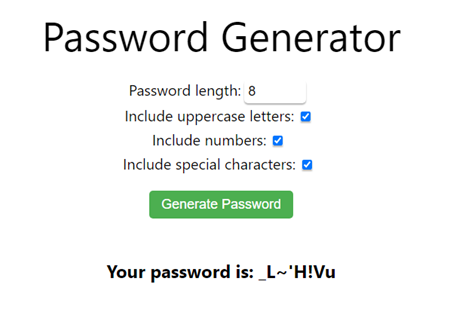
Password Generator
Free Online Strong Password Generator
DigiSadhan’s Strong Password Generator is a free online tool designed to create random, difficult-to-guess passwords for websites, email accounts, social media, Wi-Fi networks, online banking and other digital services.
A strong password should be difficult for attackers to guess and should not be based on easily available personal information. Modern password guidance emphasizes password length and unpredictability, while random generation can provide much stronger results than passwords chosen from familiar words or personal information.
The DigiSadhan tool can help generate passwords containing combinations of:
- Uppercase letters
- Lowercase letters
- Numbers
- Special characters
- Different password lengths
What is a Strong Password?
A strong password is a password that is difficult to guess, predict or discover through automated attacks.
Examples of weak password patterns include:
12345678password123qwerty123- A person’s name and birth year
- Repeated characters
- Common dictionary words
A randomly generated password can provide much greater unpredictability than a predictable password of the same length. NIST notes that randomly generated passwords generally have higher entropy than user-selected passwords of the same length.
How to Use the Strong Password Generator?
Using DigiSadhan’s password generator is simple:
Step 1: Choose Password Length
Select the desired number of characters.
Step 2: Select Character Types
Depending on the available options, include:
- Uppercase letters
- Lowercase letters
- Numbers
- Symbols
Step 3: Generate Password
Click Generate Password to create a random password.
Step 4: Copy the Password
Copy the generated password and save it securely using a trusted password manager or the account’s approved password-storage method.
Avoid posting generated passwords publicly or reusing the same password across multiple important accounts.
Strong Password Calculation and Formula
Password strength can be discussed mathematically using the concept of entropy.
If a password is generated randomly from an alphabet containing N possible characters, and the password length is L, the theoretical number of possible passwords is:
Nᴸ
The corresponding theoretical entropy is:
H = L × log₂(N)
Where:
- H = entropy in bits
- L = password length
- N = number of possible characters in the character set
NIST describes this relationship for randomly selected passwords.
Password Entropy Example
Suppose a password contains 12 characters, and each position can use one of 94 printable characters.
Then:
H = 12 × log₂(94)
Approximately:
H ≈ 78.7 bits
The total theoretical combinations are:
94¹²
≈ 4.76 × 10²³ possible passwords
This illustrates why increasing password length and randomness can dramatically increase the number of possible combinations.
However, this theoretical calculation assumes that every character is selected independently and uniformly at random. Human-created passwords usually do not meet that assumption.
Character Set Calculation
If a generator uses:
- 26 lowercase letters
- 26 uppercase letters
- 10 digits
- 32 symbols
then the theoretical character pool is:
26 + 26 + 10 + 32 = 94 characters
For a randomly generated password of length 16:
Possible Passwords = 94¹⁶
and:
Entropy = 16 × log₂(94)
≈ 105 bits
The actual security of a password also depends on how the generator creates randomness and how the password is protected after generation. NIST’s random-bit-generation standards address the importance of high-quality entropy sources and random generation.
Why Password Length Matters
Password length is one of the most important factors affecting password strength. Current NIST guidance emphasizes length and notes that composition rules alone provide limited security benefits compared with longer passwords.
For a randomly generated password, increasing length increases the number of possible combinations exponentially.
For example, if the character set contains 94 characters:
8 characters = 94⁸ combinations
12 characters = 94¹² combinations
16 characters = 94¹⁶ combinations
Therefore, adding characters can make exhaustive guessing substantially more difficult.
Strong Password Best Practices
For better account security:
Use Unique Passwords
Do not reuse an important password on multiple websites.
Prefer Long Passwords
Long passwords or passphrases are generally preferable to short passwords.
Avoid Personal Information
Do not use names, birthdays, phone numbers, addresses or other easily discoverable information.
Use a Password Manager
A password manager can generate and store unique passwords, reducing the need to memorize many random passwords. CISA also recommends considering password managers for generating and storing strong passwords.
Enable Multi-Factor Authentication
Whenever available, use MFA or another additional authentication factor.
Never Share Passwords
Do not send passwords through public posts, unsecured messages or email.
Strong Password vs Weak Password
| Weak Password | Strong Random Password |
|---|---|
| Short | Longer |
| Predictable | Random |
| Personal information | No personal information |
| Common words | Random characters |
| Reused | Unique |
| Easy to guess | Much harder to guess |
A strong password generator is particularly useful because people naturally tend to select memorable patterns, while random generation can produce much less predictable strings.
Is a 100% Random Password Secure?
Randomness improves password unpredictability, but no password should be described as absolutely unbreakable.
Security also depends on:
- Password length
- Randomness quality
- Account protection
- Rate limiting
- Multi-factor authentication
- Secure password storage
- Phishing resistance
- Whether the password has been exposed
NIST notes that attacks such as phishing, social engineering and keylogging can bypass password complexity because they attack the authentication process rather than simply guessing the password.
Benefits of DigiSadhan Strong Password Generator
- Free online password generator
- Random password creation
- Customizable password length
- Letters, numbers and symbols
- Useful for new accounts
- Helps avoid predictable passwords
- Quick and easy to use
- No manual password creation required
- Useful for students, professionals and businesses
- Mobile-friendly online tool
Frequently Asked Questions
What is a Strong Password Generator?
It is an online tool that creates random passwords using selected characters and a chosen length.
What makes a password strong?
Length, uniqueness and unpredictability are important factors. A randomly generated password is generally less predictable than a human-created password.
What is the password entropy formula?
For a uniformly random password:
H = L × log₂(N)
where L is length and N is the number of possible characters.
Is a longer password always better?
Length is an important factor, but security also depends on randomness, uniqueness and how the account is protected.
Should I use the same password everywhere?
No. Use a unique password for every important account to reduce the impact of a password compromise.
Should I save generated passwords?
Yes. A trusted password manager can help securely store and manage unique passwords. CISA recommends considering password managers for generating and storing passwords.
Is DigiSadhan’s Strong Password Generator free?
Yes. DigiSadhan provides this password-generation utility as a free online tool.
स्ट्रॉन्ग पासवर्ड जनरेटर – हिंदी में
मुफ्त Online Strong Password Generator
DigiSadhan का Strong Password Generator एक मुफ्त ऑनलाइन टूल है जिसकी सहायता से आप Websites, Email, Social Media, Wi-Fi और अन्य Online Accounts के लिए मजबूत और Random Password बना सकते हैं।
एक मजबूत Password में पर्याप्त Length, Randomness और Uniqueness होना महत्वपूर्ण है। Randomly generated passwords सामान्यतः user द्वारा बनाए गए predictable passwords की तुलना में अधिक unpredictable हो सकते हैं।
Strong Password क्या है?
ऐसा Password जिसे आसानी से Guess या Predict करना मुश्किल हो, Strong Password कहलाता है।
इन जैसे Password से बचें:
12345678password123qwerty123- नाम + जन्म वर्ष
- लगातार numbers
- बार-बार दोहराए गए characters
Strong Password Generator कैसे इस्तेमाल करें?
- Password की Length चुनें।
- Uppercase Letters चुनें।
- Lowercase Letters चुनें।
- Numbers और Symbols चुनें।
- Generate Password पर क्लिक करें।
- Generated Password को सुरक्षित Password Manager में Save करें।
एक ही Password को कई महत्वपूर्ण accounts में इस्तेमाल न करें।
Password Entropy का Formula
यदि Character Set में N characters हैं और Password की Length L है, तो theoretical entropy:
H = L × log₂(N)
जहाँ:
- H = Entropy in Bits
- L = Password Length
- N = Possible Characters
उदाहरण के लिए, यदि Password में 12 characters हैं और प्रत्येक position के लिए 94 possible characters हैं:
H = 12 × log₂(94)
≈ 78.7 bits
Possible combinations:
94¹² ≈ 4.76 × 10²³
इससे पता चलता है कि Password की Length और Randomness बढ़ने पर possible combinations बहुत तेजी से बढ़ते हैं।
Password Character Calculation
यदि Character Set में:
26 Lowercase
- 26 Uppercase
- 10 Numbers
- 32 Symbols
तो:
26 + 26 + 10 + 32 = 94 Characters
यदि Length 16 है:
Possible Passwords = 94¹⁶
और:
Entropy = 16 × log₂(94)
≈ 105 bits
यह theoretical calculation है और तभी लागू होती है जब characters वास्तव में uniformly और independently random चुने जाएं। NIST high-quality random generation के महत्व को स्पष्ट करता है।
Strong Password बनाने के Tips
- Long Password इस्तेमाल करें।
- हर Account के लिए Unique Password रखें।
- Name, DOB और Phone Number का उपयोग न करें।
- Common Words और Patterns से बचें।
- Password Manager का उपयोग करें।
- Multi-Factor Authentication (MFA) Enable करें।
- Password किसी के साथ Share न करें।
NIST वर्तमान guidance में password length को महत्वपूर्ण factor मानता है और केवल complexity rules पर निर्भर रहने के बजाय लंबे passwords/passphrases को महत्व देता है।
Strong Password Generator के फायदे
- Free Online Tool
- Random Password Generation
- Password Length चुनने की सुविधा
- Uppercase और Lowercase Letters
- Numbers
- Special Symbols
- Fast Password Creation
- Predictable Password से बचने में मदद
- Students और Professionals के लिए उपयोगी
- Mobile-Friendly
महत्वपूर्ण सुरक्षा जानकारी
कोई भी Password 100% unbreakable नहीं होता। Password की security के अलावा MFA, phishing protection, secure authentication, rate limiting और सुरक्षित password storage भी महत्वपूर्ण हैं।
Example