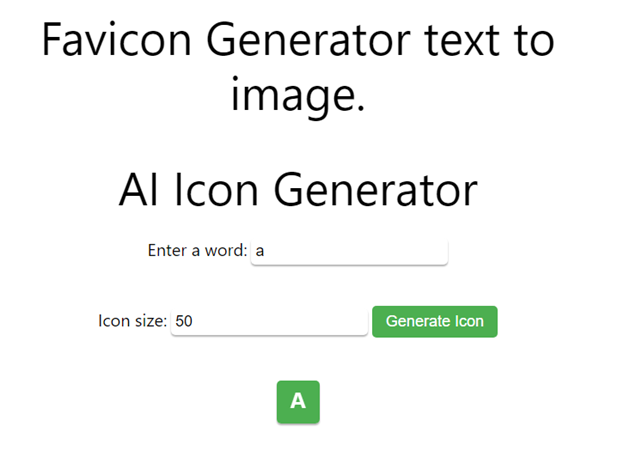
AI Icon Generator
For Advance Favicon Generator Free Tool Click here:-
A favicon is the small icon displayed next to a website’s title in browser tabs, bookmarks, browser history, and search results. DigiSadhan’s Favicon Generator helps you instantly create professional favicons from text, initials, logos, emojis, or custom images.
Whether you’re launching a personal blog, business website, eCommerce store, portfolio, or web application, a favicon improves your site’s branding and helps visitors identify your website easily.
The tool allows you to:
- Generate Favicons from Text
- Convert Images to Favicon
- Create Multiple Favicon Sizes
- Export ICO, PNG, JPG & SVG Files
- Preview Favicons Before Download
- Generate High-Resolution Website Icons
Perfect for:
- Website Owners
- Bloggers
- Web Developers
- Graphic Designers
- WordPress Users
- Shopify Store Owners
- Students
- Digital Agencies
What is a Favicon?
A favicon (Favorite Icon) is a small square icon associated with a website. It appears in:
- Browser Tabs
- Bookmarks
- Browser History
- Mobile Home Screen Shortcuts
- Progressive Web Apps (PWAs)
- Search Results (where supported)
Favicons strengthen brand identity and improve the professional appearance of a website.
Why is a Favicon Important?
Using a favicon provides several benefits:
- Makes your website instantly recognizable.
- Improves user experience.
- Builds brand identity.
- Enhances trust and professionalism.
- Helps users quickly identify open browser tabs.
- Supports modern browsers and mobile devices.
How to Use the Favicon Generator?
Using the tool is simple.
Step 1
Choose your input:
- Text
- Initials
- Logo
- Image
- Emoji
Step 2
Customize the design:
- Font Style
- Text Color
- Background Color
- Shape (Square, Rounded, Circle)
- Border Radius
- Shadow (Optional)
Step 3
Select the favicon size.
Popular sizes include:
- 16 × 16 px
- 32 × 32 px
- 48 × 48 px
- 64 × 64 px
- 96 × 96 px
- 180 × 180 px (Apple Touch Icon)
- 192 × 192 px (Android)
- 512 × 512 px (PWA)
Step 4
Click Generate Favicon.
Download your favicon in the preferred format.
Favicon Size Calculation Formula
Favicons are created by scaling an original design into smaller square dimensions.
Scale Factor Formula
Scale Factor = Target Size ÷ Original Size
Example:
Original Design:
512 × 512 px
Target Favicon:
32 × 32 px
Scale Factor:
32 ÷ 512
= 0.0625
Aspect Ratio Formula
Aspect Ratio = Width ÷ Height
Since favicons are square:
Aspect Ratio = 1 : 1
Maintaining this ratio prevents distortion during resizing.
Pixel Area Formula
Pixel Area = Width × Height
Example:
32 × 32
= 1,024 Pixels
16 × 16
= 256 Pixels
512 × 512
= 262,144 Pixels
This helps estimate rendering detail and image clarity at different resolutions.
Example 1 – Text to Favicon
Input:
Letter D
Background:
Blue
Text Color:
White
Size:
64 × 64 px
Output:
Professional favicon with the letter D.
Example 2 – Logo to Favicon
Upload:
Company Logo
Target Size:
32 × 32 px
Result:
Optimized favicon for browser tabs while preserving the logo’s identity.
Example 3 – Batch Favicon Generation
Original Image:
512 × 512 px
Generated Files:
- 16 × 16
- 32 × 32
- 48 × 48
- 64 × 64
- 180 × 180
- 192 × 192
- 512 × 512
Suitable for modern browsers, mobile devices, and Progressive Web Apps.
Recommended Favicon Sizes
| Purpose | Recommended Size |
|---|---|
| Browser Tab | 16 × 16 px |
| Standard Desktop | 32 × 32 px |
| Windows Shortcut | 48 × 48 px |
| High-Resolution Icon | 64 × 64 px |
| Apple Touch Icon | 180 × 180 px |
| Android Icon | 192 × 192 px |
| Progressive Web App | 512 × 512 px |
Applications of Favicon Generator
This tool is useful for:
- Business Websites
- Blogs
- WordPress Websites
- Shopify Stores
- Portfolio Websites
- Educational Portals
- News Websites
- SaaS Platforms
- Progressive Web Apps (PWAs)
- Mobile Web Applications
Benefits of Using Our Favicon Generator
- Create Favicons from Text or Images
- Multiple Export Formats
- High-Resolution Output
- Automatic Size Generation
- Live Preview
- Browser-Compatible Icons
- Mobile-Friendly Interface
- Fast & Secure
- 100% Free Online Tool
Frequently Asked Questions (FAQs)
What is a favicon?
A favicon is a small icon representing a website in browser tabs, bookmarks, and mobile shortcuts.
What is the standard favicon size?
The most common browser favicon size is 16 × 16 pixels, while modern websites also generate 32 × 32, 180 × 180, and 512 × 512 versions for different devices.
Can I create a favicon from text?
Yes. You can create favicons using letters, initials, words, emojis, or logos with customizable colors and fonts.
Which file format is best?
The ICO format offers broad browser compatibility, while PNG is preferred for modern web development due to its high quality and transparency support.
Is this tool free?
Yes. DigiSadhan’s Favicon Generator is completely free and works directly in your browser.
फेविकॉन जनरेटर – वेबसाइट के लिए टेक्स्ट एवं इमेज से फेविकॉन बनाएं
मुफ्त ऑनलाइन Favicon Generator
यदि आप अपनी वेबसाइट के लिए Favicon बनाना चाहते हैं, तो DigiSadhan का Favicon Generator एक तेज़, सुरक्षित और आसान ऑनलाइन टूल है।
यह आपको टेक्स्ट, लोगो, इमेज या इमोजी से पेशेवर फेविकॉन बनाने की सुविधा देता है।
Favicon क्या है?
Favicon वेबसाइट का छोटा आइकन होता है जो दिखाई देता है:
- Browser Tab
- Bookmark
- Browser History
- Mobile Shortcut
- PWA Icon
यह आपकी वेबसाइट की पहचान (Brand Identity) को मजबूत बनाता है।
Tool का उपयोग कैसे करें?
- टेक्स्ट, लोगो या इमेज चुनें।
- रंग एवं डिज़ाइन अनुकूलित करें।
- आवश्यक आकार चुनें।
- Generate Favicon पर क्लिक करें।
- ICO, PNG या अन्य फ़ॉर्मेट में डाउनलोड करें।
गणना का सूत्र
Scale Factor
Scale = नया आकार ÷ मूल आकार
Aspect Ratio
Width ÷ Height = 1 : 1
Pixel Area
Width × Height
उदाहरण
उदाहरण 1
“D”
↓
64 × 64 px
↓
Favicon तैयार
उदाहरण 2
Logo
↓
32 × 32 px
↓
Browser Favicon
उदाहरण 3
512 × 512
↓
16 × 16
32 × 32
180 × 180
512 × 512
एक क्लिक में सभी आकार तैयार
Favicon Generator के लाभ
- टेक्स्ट से फेविकॉन बनाएं
- लोगो से फेविकॉन तैयार करें
- कई आकारों में डाउनलोड
- ICO एवं PNG समर्थन
- उच्च गुणवत्ता
- वेबसाइट एवं मोबाइल के लिए उपयुक्त
- 100% निःशुल्क
- मोबाइल एवं कंप्यूटर पर उपयोगी
Example: